Building My Own Cloud
Infrastructure-as-Self-Service
7 min read
Read TimeApril 29, 2026
Published OnOne of the first questions that a platform team might be asking when it comes to setting up a Kubernetes cluster is: do we go cloud or bare metal? I guess you could also put “edge” in there, but mostly it’s going to be between the former two. So when I was designing my own Kubernetes homelab, I was also faced with a similar question.
I say similar, because when I say cloud, I actually mean a managed virtualization environment, which is different from a public or private cloud. Albeit that the foundation for cloud computing is virtualization. Technically I do have the option to build and run my Kubernetes homelab in the cloud, but I guess that would defeat the purpose of a homelab.
So the real question for me was choosing between virtualization or bare metal. Spoiler: I went for virtualization.
But before I go deeper into my choice, let me first share the hardware I’m currently working with and how much I spent:
- HP EliteDesk 800 G2 i5-6500T/4 CPU/32GB/250GB SSD
- HP EliteDesk 800 G2 i5-6500T/4 CPU/32GB/256GB SSD
- HP EliteDesk 800 G2 i3-6100/4 CPU/32GB/250GB SSD
- HP EliteBook 640 G9 i5-1235U/12 CPU/32GB/1TB SSD
I purchased all of them from Marktplaats for well under 100 euros per server, excluding the EliteBook. That one was a bit more expensive than the EliteDesk’s combined, but I didn’t have the intention to use it for my homelab when I got it. The only thing I upgraded was the memory for all the EliteDesks, and with the ram prices lately, that also added a fair bit to the total price.
So in total, not counting the EliteBook, since I already own that, I spent under 400 euros for the entire infrastructure for my homelab; that includes, cables, a switch, and the 6 euros worth of filament for the mini-rack I 3D-printed :)
Another bonus is that the total usage is max 35W per server.
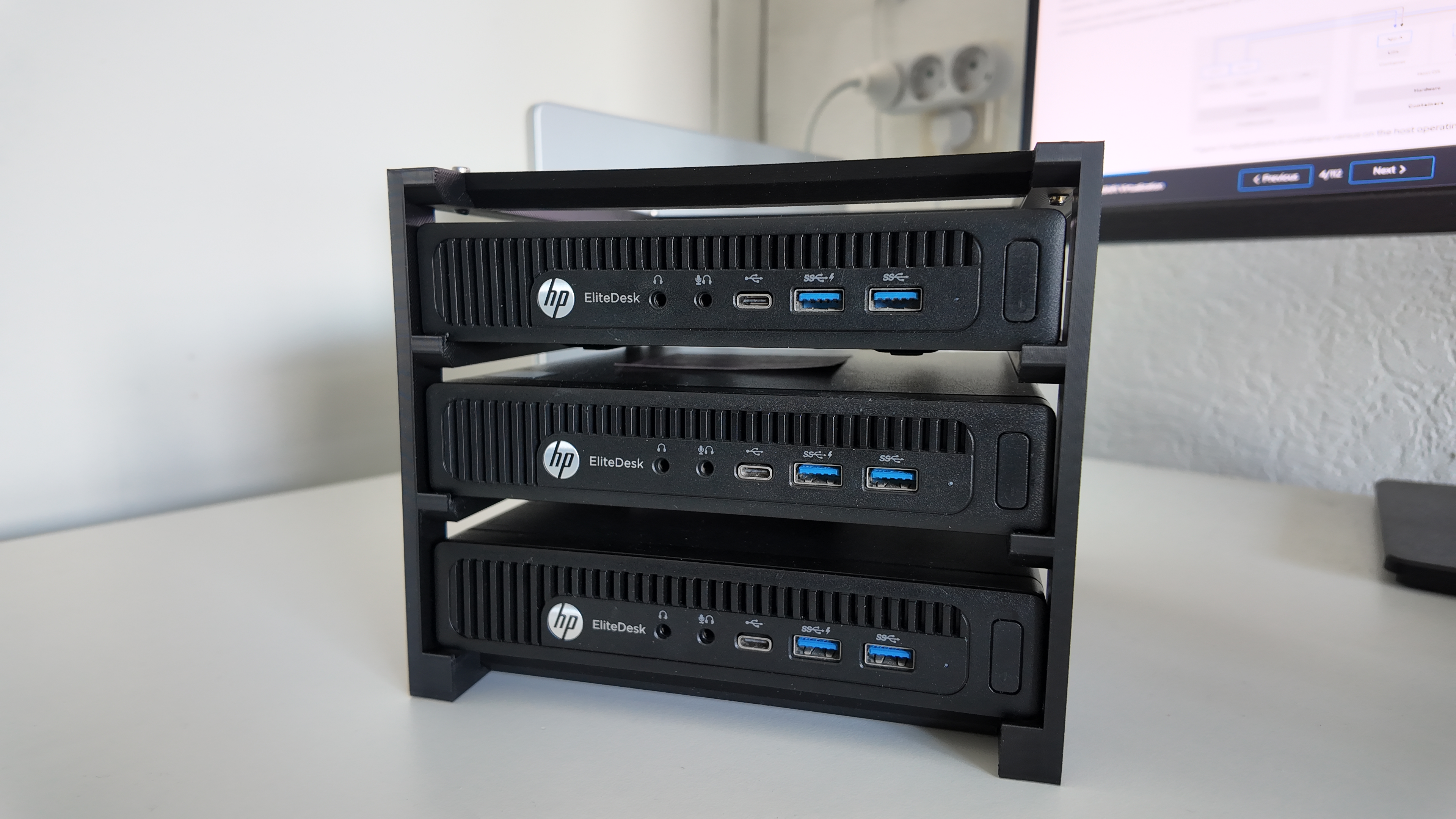
Getting back to virtualization versus bare metal. My main reason for building this homelab is to learn, experiment, and break things in a safe environment. Since learning is a big part of it, I also wanted to learn more about virtualization. Just a side note: I’m currently preparing for the Red Hat Certified Specialist in OpenShift Virtualization exam as part of my road to becoming RHCA. So for me, choosing virtualization over bare metal simply provides me the flexibility and opportunity to do both, i.e. learn more about virtualization and build not just my Kubernetes homelab, but effectively build my own cloud on my own infrastructure.
Speaking of infrastructure, 4 nodes is probably the bare minimum for a Kubernetes cluster. Sure, for a pure homelab, 2 nodes (a control plane and a worker) is probably all you need, you could even get away with just a single control plane, but it’s far from replicating a Kubernetes production cluster, and the goal I have is to mimic that as close as possible. Because let’s be honest, Kubernetes for a homelab is probably overkill anyways.
So with my current infrastructure, I could go for 3 control planes and 1 worker, but then I would lose the ability to experiment with anti-affinity rules and multi-node scheduling. Well, that is if I would go for the bare metal approach. But since I’m going the virtualization road, now I have a bit more flexibility.
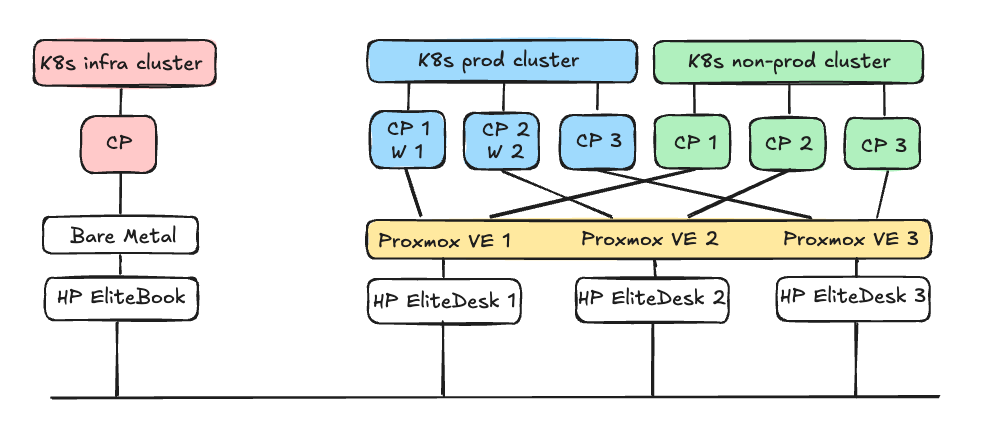
As you can see from the design above I’m planning to use Proxmox as the virtualization environment that I’ll be clustering up. I was planning to create Ceph storage, but for that, I would need to install second hard drives on all of the servers, which I didn’t want to do, because I have the “T” version of the Intel processor and that comes with one fan for the CPU and doesn’t have a second fan for the hard drive. I’ve read that depending on the load on the hard drives that it could heat up in this small form factor, so I decided to not set up Ceph storage. Adding additional hard drives would also add to the cost.
On top of Proxmox is where I want to set up Kubernetes using Talos Linux, and I’m planning to create 2 clusters on Proxmox: a production and a non-production cluster, each running 3 control planes, and 2 worker nodes for the production cluster. I’m not planning to set up worker nodes for the non-production cluster, but I will allow scheduling workloads on the control plane. So in total I will be provisioning 8 virtual machines in Proxmox.
I also want to try to put the clusters in different VLAN’s for network segmentation, but if that doesn’t work, then I’ll just do that on a namespace level with network policies.
Then I have another cluster which I will install on bare metal, and that will become my infra or shared services cluster. Here I’m planning to run services like Keycloak for SSO and Harbor as an image registry etc.